Uh oh! Are you receiving email non-delivery reports (bounces or rejections) warning you of DMARC failures? If you’re scratching your head wondering what that means, you’re not alone. Domain-based Message Authentication, Reporting, and Conformance (DMARC) is a key protocol in protecting your domain from email spoofing, but when things go wrong, it can leave your legitimate emails stranded.
In simple terms, DMARC failures mean your emails aren’t passing the security checks that DMARC enforces, and as a result, they’re getting blocked or rejected. This can be frustrating, especially when trying to maintain communication with customers or partners.
But don’t worry, DMARC failures aren’t the end of the road. In this post, we’ll break down what these errors mean, why they happen, and, most importantly, what you can do to fix them. Whether you’re dealing with the occasional bounce or a more widespread issue, we have the insights to get your emails back on track. Read on to remedy your DMARC fail results.
Key takeaways
-
DMARC failures happen when your email isn’t properly authenticated through SPF or DKIM, causing messages to bounce or get rejected by inbox providers.
-
Most DMARC fails stem from misconfigurations across email services—like CRMs, ESPs, or business email platforms—that aren’t fully aligned with your domain.
-
Fixing DMARC fails requires identifying all your sending platforms, ensuring proper SPF/DKIM alignment, and testing to confirm your setup passes DMARC checks.
What does DMARC failure look like?
To successfully implement DMARC to protect your email domains against phishing and spoofing, you must authenticate all the legitimate emails you send. This means configuring either (or both) DomainKeys Identified Mail (DKIM) and Sender Policy Framework (SPF) email authentication protocols to ensure that all of the email messages that your company sends – 1:1 email, transactional messages, email newsletters, or email marketing – are fully and properly authenticated, proven to be legitimately utilizing your email domain name in the from address.
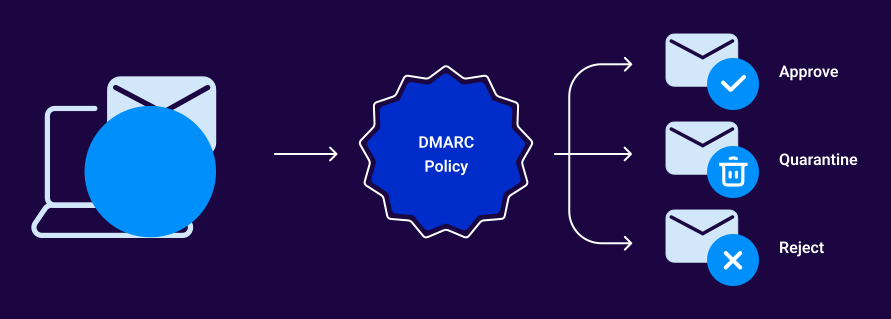
If you fail to configure either DKIM or SPF properly, your email message can be rejected if your DMARC policy is set to tell inbox providers to reject messages that aren’t fully authenticated.
What happens when DMARC fails?
A DMARC failure creates a technical alert, but it also has real consequences for your business. Depending on your DMARC policy and how inbox providers interpret the failure, here’s what can happen:
1. Emails may go to spam
If your policy is set to p=none, failed messages aren’t blocked, but inbox providers like Gmail or Outlook may treat them as suspicious. That often means your legitimate emails end up in the spam folder, reducing open rates and customer engagement.
2. Messages can be quarantined
With p=quarantine, failed messages are typically delivered but placed in the recipient’s spam or junk folder. This protects users but can cause critical communications—like invoices, contracts, or password resets—to be overlooked.
3. Emails get rejected entirely
If your policy is set to p=reject, failed messages are blocked at the gateway. This is effective at preventing spoofing and phishing, but it also means legitimate emails will bounce if SPF and DKIM aren’t configured correctly.
4. Brand reputation suffers
Repeated DMARC failures signal to mailbox providers that your domain isn’t trustworthy. Over time, this can hurt your domain’s sender reputation, making it harder for even authenticated emails to land in the inbox.
5. Business risk increases
Attackers often exploit domains without proper DMARC enforcement. A high DMARC fail rate can leave your business open to phishing attacks, domain spoofing, and fraud, all of which erode customer trust.
Key takeaway:
A DMARC fail isn’t just a technical mistake. It directly impacts deliverability, brand credibility, and security. Understanding these risks is the first step to fixing failures and protecting your domain.
The most common DMARC failure examples
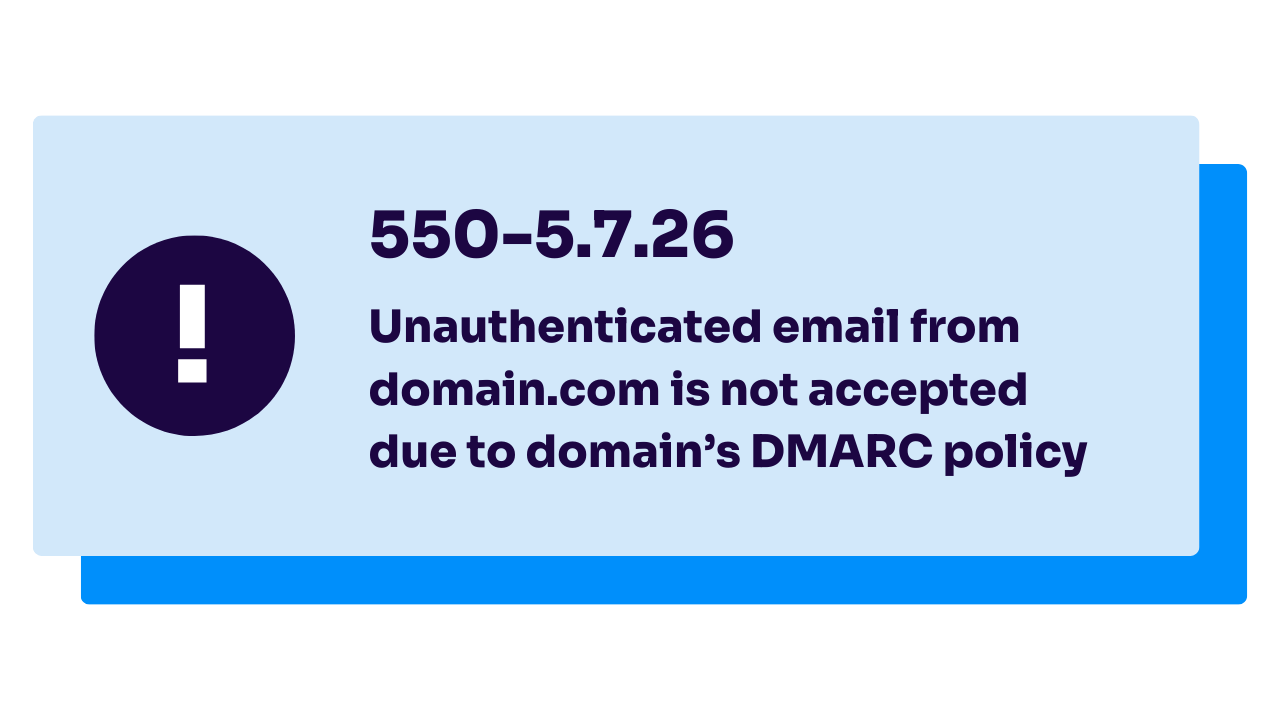
Almost all inbox providers will send rejections back in the case of improperly authenticated email violating a domain’s DMARC policy.
-
- Gmail’s response: “550-5.7.26 Unauthenticated email from domain.com is not accepted due to domain’s DMARC policy. Please contact the administrator of [your] domain if this was a legitimate mail. To learn about the DMARC initiative, go to https://support.google.com/mail/?p=DmarcRejection – gsmtp.”
- Microsoft Outlook’s response: “550 5.7.509 Access denied, sending domain does not pass DMARC verification and has a DMARC policy of reject. [ABC123.namprd13.prod.outlook.com].”
- Yahoo’s response: “554 5.7.9 Message not accepted for policy reasons. See https://senders.yahooinc.com/error-codes.”
Almost always, the rejection will specifically refer to DMARC policy and indicate that a given email message is in violation of a sending domain’s DMARC policy. This almost always points to a misconfiguration in email authentication settings for some email service used by the owner of that email domain.
That’s where Valimail comes in. Think of us as the “easy button” for DMARC. Our platform automatically discovers every sender using your domain, pinpoints what’s failing, and guides you through fixes without the guesswork. Instead of spending weeks untangling complex DNS changes, you can achieve DMARC enforcement in days, sometimes even hours.
Valimail Monitor can give you global visibility of your email sending services for free so you can see if your DMARC is failing.
How to fix DMARC failures
You’ll want to make a list of all the email sending services you utilize to send email messages using your email domain name. This could include
-
- Email Service Providers (ESP) or Email Newsletter Platforms like Mailchimp, Substack, or various Marketing Clouds
- Customer Relationship Management (CRM) Platforms like Insightly CRM, Salesforce or HubSpot
- Business Email Platforms for 1:1 email, like Microsoft 365 or Google Workspace
If you’re a Valimail customer, our Precision Sender Intelligence functionality can help you properly identify these email services and more, helping you easily map out your full email sending universe.
After you’ve identified each of your email sending platforms, you’ll need to review their guidance and documentation on how to implement DKIM and SPF email authentication properly.
-
- For DKIM, almost every email send platform allows you to “configure a custom domain” or “enable email authentication” to allow you to sign messages using your domain – making sure the DKIM signature domain “aligns” (matches) the visible from domain in your email sends. DKIM “alignment” is always a best practice and almost always necessary to pass DMARC checks properly, to prevent unexpected email rejections.
- For SPF, only certain send platforms will allow you to customize the “return-path” domain to enable full “alignment” of the SPF domain to your visible from domain. Be sure to read their documentation and follow their guidance. And if they encourage you to focus only on DKIM; that’s generally going to be okay.
After confirming that you’ve implemented or corrected the email authentication configuration for a given email send platform, test it using our new Email Analyzer Report, available free to users of Valimail Monitor.
Common causes of DMARC fail (with real examples)
DMARC failures can feel confusing if you’re unsure what’s happening behind the scenes. The truth is, most failures come down to a handful of common issues. By understanding these scenarios, you can troubleshoot and prevent problems more quickly.
1. Email forwarding
Forwarded emails are a frequent source of DMARC fails. When a message is forwarded, the forwarding server may change the “envelope from” address or modify headers, breaking SPF alignment. While DKIM usually survives forwarding, any small header changes can still invalidate signatures.
Example: An employee forwards an email from user@yourdomain.com through a mailing list, and the SPF check fails because the forwarding server isn’t listed in your SPF record.
2. Misconfigured third-party senders
Any platform that sends on your behalf, such as Salesforce, Mailchimp, Zendesk, or Microsoft 365, needs to be explicitly authorized. If you forget to add these services to your SPF record or enable DKIM for them, their messages will fail DMARC.
Example: Your marketing team sends a campaign through Mailchimp, but Mailchimp isn’t included in your SPF record. The messages appear as spoofed and fail DMARC checks.
3. Subdomain vs. root domain alignment issues
Another overlooked problem is misalignment between subdomains and the root domain. For instance, mail sent from mail.example.com may fail DMARC if policies are only applied to example.com and not extended to subdomains.
Example: A helpdesk tool sends from support.example.com, but only the root domain is configured. Result: messages from the subdomain fail DMARC checks.
4. Expired or missing DKIM keys
DKIM relies on cryptographic keys published in DNS. If keys expire, rotate incorrectly, or are missing entirely, signatures won’t validate. Without DKIM, your domain relies only on SPF, which may not be enough to pass DMARC.
Example: Your IT team rotates DKIM keys but forgets to update the DNS record. All outgoing messages suddenly fail DKIM and, by extension, DMARC.
5. Multiple SPF records
DMARC requires a single, valid SPF record. If your domain has multiple SPF records (a common mistake when adding new services), validation will fail.
Example: Your DNS shows two SPF records:
This setup invalidates SPF entirely, causing every message to fail DMARC.
Common DMARC record mistakes to check for
If you’re running into this very specific and unique “554 5.7.5 Permanent Error Evaluating DMARC Policy” error message, a rejection received back when trying to send email messages to specific domains, this error message is warning you that your domain’s DMARC record is misconfigured; some part of it may have extra characters, be missing characters, or have bits of settings configured incorrectly.
Errors in your DMARC configuration can include:
-
- More than one DMARC DNS TXT record for a given domain (only one is allowed)
- Missing or extra periods in various places in the DNS TXT record
- Missing “mailto:” in the email address section of the RUA (aggregate reporting address) or RUF (forensic reporting address) in the DNS
- Typo or misspelling of a setting or option in the DNS TXT record, such as policy= instead of p= or p=none instead of p=none
DMARC fail troubleshooting checklist
Here’s a quick checklist to diagnose and fix DMARC failures:
Review DMARC aggregate reports (RUA) for failing sources.
Confirm all legitimate senders (CRM, ESP, helpdesk, payroll, etc.) are included in your SPF record.
Make sure only one SPF record exists for your domain.
Check that DKIM is enabled and aligned with your domain.
Rotate or update DKIM keys if they’ve expired or been misconfigured.
Verify subdomain policies match your root domain if both are sending.
Test by sending emails to Gmail, Outlook, and Yahoo, and check the Authentication-Results header.
If using forwarding, enable DKIM with relaxed alignment or consider ARC.
Adjust your DMARC policy gradually (none → quarantine → reject).
Fix DMARC failures the easy way
Struggling with DMARC failures can feel overwhelming. It’s hard to know where to start, from misaligned SPF records to missing DKIM keys and confusing forwarding issues. Every failed message puts your business at risk of lost emails, damaged deliverability, and even domain spoofing attacks.
Don’t let DMARC failures block your emails or expose your brand to fraud. Schedule a free consultation with one of our DMARC experts to discover how we can help fix your DMARC fail and get your mail delivered.
Can forwarded emails cause DMARC fails?
How can I test if my DMARC is failing?
What does a DMARC fail mean?
Why would a legitimate email fail DMARC?
What happens if my DMARC policy is set to reject and emails fail?
If your DMARC policy is set to p=reject and a message fails DMARC, the receiving mail server will block delivery outright. This is the strongest level of protection against phishing and spoofing, since it prevents unauthorized senders from impersonating your domain. However, if your SPF/DKIM setup isn’t complete, even legitimate emails can be rejected. Before moving to p=reject, it’s best to:
-
Start with
p=noneto monitor traffic and gather data. -
Move gradually to
p=quarantinewhile fixing issues. -
Only adopt
p=rejectonce you’re confident all legitimate services are fully authenticated.